A Movement Break Between Screen Tasks: A Low-Fuss Routine
A movement break between screen tasks can ease a long spell in one posture with simple seated and standing moves that fit around ordinary desk work.
You finish a video call, leave the laptop open and reach for the next task without moving from your chair. A movement break between screen tasks can interrupt that long stretch in one posture with a few ordinary movements, not a workout or a test of fitness.
Think of the routine as a change of position: sit, stand, shift your weight, then settle somewhere comfortable again. Choose only movements that feel manageable, and let the next task—not a timer or a target—be the cue to pause.
1. Reset your sitting position
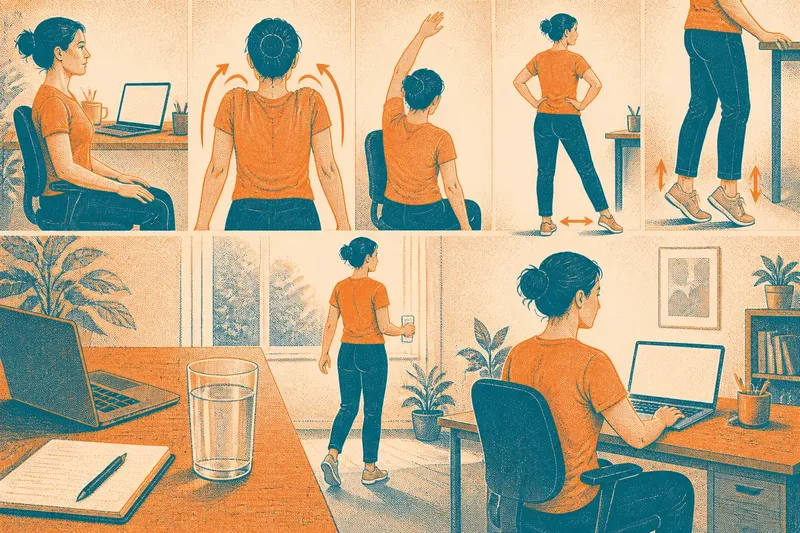
Before standing, place both feet on the floor and let your hands rest on your thighs or desk. Sit a little taller without forcing your back into a rigid pose, then allow your shoulders to settle.
This small reset gives you a moment to notice how you have been holding yourself. If your chair is too high for your feet to reach the floor comfortably, use a stable footrest or adjust the chair if possible; there is no need to maintain one supposedly perfect posture.
2. Roll your shoulders gently
With your arms loose, draw your shoulders up slightly, move them back, and let them fall. Repeat at an easy pace, then reverse the direction if that feels comfortable.
Keep the movement modest. The point is to change what your shoulders are doing after typing or mouse work, not to pull them as far as they can go. If circles feel awkward, simply lift and lower them once or twice.
3. Reach from the chair
Keep your feet planted and reach one arm towards the ceiling, as if making room between your ribs and hip. Return it to your side, then try the other arm. Let your torso remain mostly upright rather than leaning hard to one side.
A reach can be smaller than your full range of motion. If raising an arm is uncomfortable, slide that hand forward along the desk or rest it on your thigh instead. Avoid pushing through pain or tingling.
4. Stand and find your balance
Push up from the chair in your usual way, using the armrests or desk for support if you need them. Once upright, pause with your feet comfortably apart and notice how your weight is shared between them.
Shift your weight gently towards one foot and then the other, without lifting either foot. This is enough to make standing feel different from sitting; there is no need to balance on one leg or turn the pause into a challenge.
5. Let your ankles move
While holding the desk lightly or standing near a stable chair, lift your heels and lower them again. Then lift the front of your feet while keeping your heels down, if that is comfortable.
These small ankle movements offer another change of position after time with your feet still. Keep your knees soft and the movement controlled. If standing feels unsteady, sit back down and move one foot at a time instead.
6. Add a few easy steps
Walk to refill a glass, collect a notebook or look out of a nearby window. If you cannot leave your workspace, take a few steps beside your desk, keeping the route clear of bags, cables and open drawers.
Walking is optional, not the measure of whether the break counts. If space is tight or you use a mobility aid, choose a safe movement that suits your environment, such as shifting position in your chair or rolling your shoulders.
7. Return with a different position
When you sit again, try placing your feet in a slightly different comfortable position and bring the keyboard or notebook within easy reach. You are not trying to hold a new posture for the rest of the day; just avoid dropping straight back into the exact shape you had before.
Say you have just finished drafting a report and the next task is answering messages. You might roll your shoulders, reach each arm, stand to shift your weight, walk to fill your glass and then sit with both feet supported. The observable change is simple: you have moved through several positions before starting the next screen task.
When should you take a movement break?
How long should a movement break last?
There is no single duration that suits every person or workday. A few comfortable movements may fit a short pause, while a longer gap between tasks can make room for a brief walk.
Do you need to do every movement?
No. Choose the positions and movements that feel suitable, and leave out anything that causes discomfort or does not fit your workspace. A small change in posture is a reasonable break on its own.
Can you take a break without leaving your desk?
Yes. You can reset your sitting position, move your shoulders, reach gently or move your feet while seated. Keep any desk items in place if shifting them would create a distraction or an awkward reach.
What if a movement feels uncomfortable?
Stop that movement and choose a comfortable alternative, or return to a resting position. For persistent symptoms, an injury or a health condition that affects movement, ask a qualified health professional for advice suited to you.
Keep the cue simple
It is not worth arranging an elaborate sequence, changing clothes or tracking how many repetitions you complete for a brief workday pause. A practical cue is enough: after sending a file, ending a call or making a cup of tea, change posture before beginning another screen task.
For a movement break between screen tasks, consistency can mean choosing a pause that is easy to repeat, not following the same set of moves every time. Keep a clear space near your desk, use a stable chair for support when needed, and let comfort guide which movements stay in the routine.